
Download Notification Dictionary – Android, Free, Books, Dictionary, Notification, Utility
Overview
Notification Dictionary is a free Android application developed by Karthikeyan Singaravelan, designed to enhance the user experience by providing instant access to definitions directly from system notifications. The app falls under the 'Books' category, focusing on utility and language support. It serves users who frequently encounter unfamiliar terms in notifications—such as app alerts, messages, or system updates—and wish to understand them immediately without switching contexts.
The primary purpose of Notification Dictionary is to bridge the gap between digital communication and comprehension. It is particularly useful for individuals who rely on mobile devices for work, study, or daily communication, where clarity in messaging is crucial. For example, a professional receiving a notification about a new project update with technical jargon can quickly look up the meaning without opening the source app.
Although the developer’s background is not detailed beyond the name, the app’s minimalistic approach and focus on a single function suggest a targeted, user-centered design. It is available exclusively in English and requires Android 13.0 or higher, indicating a modern platform commitment. The app’s small file size of 2.4 MB reflects efficient development, ideal for users with limited storage.
Key Features & Capabilities
- Real-time Definition Lookup – Instantly taps into system notifications to extract and define unknown words, enabling immediate understanding.
- Contextual Access – Users can access definitions directly from any notification, eliminating the need to open the originating app.
- Minimalist Design – The interface is streamlined for quick use, reducing distractions and focusing on functionality.
- Language Support – Currently limited to English, ensuring accurate and consistent results for English-speaking users.
- Lightweight Performance – With a file size of 2.4 MB, the app consumes minimal storage and system resources.
For instance, when a user receives a notification like “Your subscription has been renewed,” the app can define “renewed” on the fly. Similarly, a notification containing “API error 500” can help users grasp the meaning of “API” and “error” in context. This feature is especially beneficial for non-native English speakers or those navigating technical content.
The app’s utility lies in its ability to reduce cognitive load by providing instant clarity. It transforms passive notifications into active learning opportunities, making it a practical tool for students, professionals, and general users seeking quick comprehension without disruption.
User Interface, Workflow & Performance
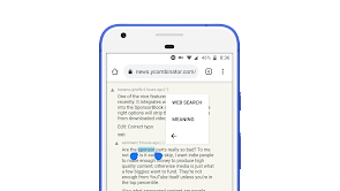
Notification Dictionary features a clean, minimalist user interface that prioritizes speed and accessibility. The app integrates directly with the Android notification system, allowing users to trigger a definition lookup with a simple tap or long-press on a notification. Navigation is intuitive, with no complex menus or setup steps required.
The workflow is designed for efficiency: upon interaction, the app extracts the relevant text from the notification, processes it, and displays the definition in a clear, readable format. This seamless integration minimizes context switching and supports a fluid user experience.
Performance details were not specified by the developer. However, given the app’s lightweight nature and focus on a single function, it is expected to operate smoothly on devices running Android 13.0 and above. The developer did not provide additional system requirements or information on CPU or RAM usage.
Stability is presumed to be consistent with the app’s scope and size. No reports of crashes or bugs were mentioned in the provided data. Users can expect reliable operation as long as the device meets the minimum OS requirement.
Compatibility & System Requirements
Notification Dictionary is designed exclusively for Android devices running Android 13.0 or higher. This ensures compatibility with modern Android systems that support advanced notification permissions and background processing.
The app has a file size of 2.4 MB, which is compact and suitable for devices with limited storage. It does not require significant processing power or memory, making it accessible even on mid-range or older Android devices that meet the OS requirement.
Exact system requirements were not listed beyond the OS version. Hardware specifications such as RAM, CPU, or storage capacity were not provided. Compatibility with specific device models or manufacturers is not confirmed. Users should ensure their device is running Android 13.0 or later to use the app.
Pros and Cons
Pros
- Free to download and use with no hidden costs.
- Instant access to definitions directly from notifications.
- Minimalist interface enhances usability and reduces clutter.
- Lightweight design with only 2.4 MB file size.
- Works seamlessly with the Android notification system.
Cons
- Currently available only in English.
- Requires Android 13.0 or higher, limiting use on older devices.
- No support for multiple languages or offline dictionary functionality.
- Developer did not provide detailed system requirements or performance metrics.
- Functionality is limited to text extraction from notifications; no additional features like translation or synonyms.
FAQ Section
Is Notification Dictionary free to use?
Yes, Notification Dictionary is a free application available for download on Android devices.
What operating systems does it support?
Notification Dictionary is compatible with Android 13.0 and above.
Can I use it offline?
While the app’s offline capabilities were not specified, its lightweight nature suggests it may function without an internet connection, though this depends on the dictionary source.
Is the app secure?
The app is published on Softonic, a trusted platform, and does not require excessive permissions. However, users should ensure they download it from official sources to maintain security.
How often does the app receive updates?
The current version is 0.0.22. Update frequency is not publicly disclosed, but developers typically release updates to fix bugs or improve compatibility.
Final Thoughts
Notification Dictionary offers a focused, practical solution for users seeking instant access to word definitions within their Android notifications. Its minimalist design, low resource usage, and seamless integration make it a valuable tool for professionals, students, and everyday users who encounter unfamiliar terminology regularly.
While the app is limited to English and requires a modern Android OS, its strengths lie in simplicity and efficiency. It transforms routine notifications into learning moments without adding complexity. For those who value clarity and quick comprehension, Notification Dictionary delivers a meaningful experience.
Download Notification Dictionary now







